Top Left Corner Top Top Right Corner
Left

fennel DVDManager Pro

Download fennel DVDManager Pro

Introducing fennel DVDManager Pro [French ?]

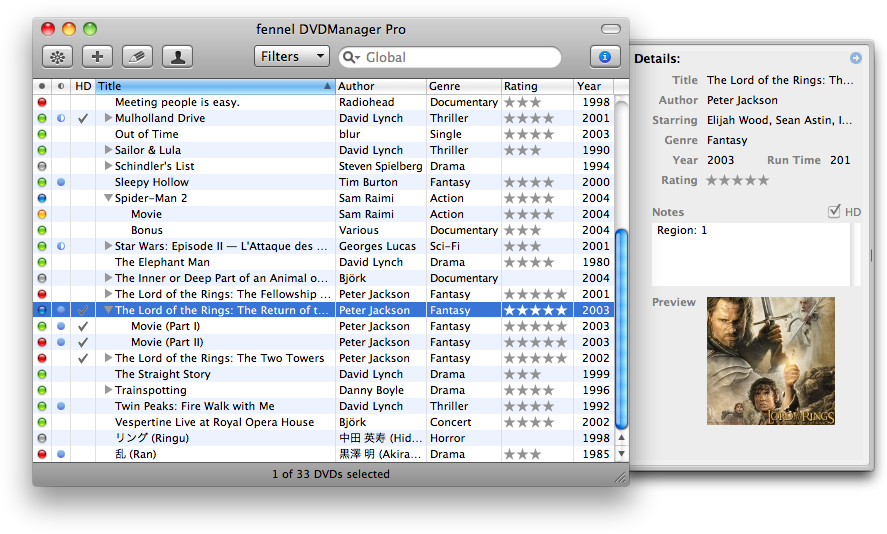
fennel DVDManager Pro (aka fsDMP) is a complete rewrite of our DVDManager (fsDM) project: like Mac OS X Snow Leopard—for which it is of course qualified—, it's now ready for the years to come!  Alongside some new features and enhancements (see below), it also has inherited all the goods from fsDM: qualified for Mac OS X Leopard, still compatible with Mac OS X Tiger, localized in 17 languages, etc.  At last, your transition from fsDM should be really smooth: your DVD library being duplicated, then automatically imported, you'll be ready in no time to better manage the workflow of your DVDs!


New Features

  • (29) Wanna try before purchasing? Introducing our new Demo Mode: freely play with a sample DVD library for one-hour sessions!
  • Added support for Custom Genres (with completion for the default genres), HD content (i.e. Blu-ray discs, CBHDs, HD-DVDs, etc.), and Personal IDs (for those who want to index and thus precisely locate their DVDs).
  • (34) New Mark as Watched/Mark as Unwatched actions (w/ their dedicated State column).
  • (25) Retrieve: Selecting a search result displays its preview to help you confirm it's the one DVD you were looking for.
  • (26) On (Snow )Leopard, the number of lent DVDs is now displayed in the Dock as an application badge.
  • (22) Associated a convenient contextual menu to the table view's headers for easily managing columns.
  • At long last, our Search engine is now also looking for data in your Notes!
  • (27/29) Now also localized in Italian, with some preliminary support for Traditional Chinese too.

Enhancements

  • Thanks to the rewrite, enjoy a new speedy launch time!
  • Please also welcome a more flexible box set management:
    • One can now edit the number of discs a box set contains, as long as a box set remains a box set…
    • Sweetened the limitation which forbad one to remove a disc from a box set; it's now allowed, as long as a box set remains a box set…
  • (22/24) As required by Amazon, all calls to their API are now signed for some increased security.
  • (22) Replaced our custom method for truncating "long" titles, authors, genres, and contacts with Mac OS X's built-in mechanism for some increased performance.
  • (21) Now retrieves more than one author for entries with multiple authors (i.e. directors, artists, etc.).
  • (22) When no item is selected, the status bar is now also mentioning the total number of box sets in your DVD library.
  • (22) Our Filters, Rate, and Web Export items now feature a custom menu form representation, for you to keep on using them even if not visible in the toolbar.
  • (21) Retrieve: Added a progress indicator to indicate when a search process is ongoing.
  • (21) Similarly to our global and contextual menus, the Rate toolbar item now also displays the state of the current selection.
  • (22) Similarly to our global menu, items of the Web Export toolbar item's submenu are now also validated.
  • The width of the Details pane is now saved between sessions.
  • Similarly to our Edit mode, the Multi-Edit mode now uses red labeling to indicate invalid values for Year and Run Time fields.
  • Selections containing some discs and their parent box set weren't qualified for removal… until today!
  • (22) Improved in Edit modes how hold'n'dragging the Rating control behaves on Tiger; if it's not yet working like on Leopard, it's heading in the right direction…
  • (21) Streamlined our contextual menu by removing the (rather inappropriate) global Add, Filter, and Search options.
  • (27) Dock Badging: Added a Dock menu item to describe what this badged number means.
  • (33) On the Import sheet opening, if a CSV file is found in your Documents folder, it is now preselected.
  • (27) The Run Time column is now resizable (allowing its header to be fully displayed in some languages) and features a better minimum size.
  • (26) Added a separator to the Action menu to separate contextual actions (Manage, Add to Wish List) from global ones (Filter, Search).
  • (27) Re-labeled the ID column header to "ID" (from "#") for some improved clarity and consistency.
  • (22) Pruned the image from the menu form representation of button-shaped toolbar items to better comply with Apple's HIG.
  • (27) To better comply with Apple's HIG, the OK button in the Unregister sheet has been re-labeled to "Unregister".
  • Japanese (ja): Now with right-aligned labels, hopefully resulting in a nicer layout.
  • (29) French (fr): Clicking the Buy a License button now redirects the user to the French version of the corresponding webpage.

Fixes

  • (33) Addressed a migration issue affecting old (i.e. pre-2005) DVD libraries.
  • (23) Fixed a regression introduced in build 22 which prevented global searches from correctly working.
  • (27) Brazilian Portuguese (pt_BR): Addressed a regression introduced in build 22 leading the Filters toolbar item to being broken.
  • (21) On (Snow )Leopard, the selected items—and not the clicked item—were the target of most contextual actions.
  • (21) Fixed a memory problem affecting our Sort action when filtering or searching for some DVDs.
  • (33) Corrected the handling of box sets when migrating some specific databases; any affected DVD library being cleaned.
  • (26) Personal IDs were sorted alphabetically; they're now sorted alphanumerically (so that ID #2 comes before ID #19…).
  • (27) Dock Badging: Corrected some false counts resulting from removing an item or adding it to the wish list.
  • (22) On Tiger, in Edit modes, hold'n'dragging the Rating control could lead to invalid values; it's no longer the case, the affected libraries being fixed.
  • (22) With our more flexible box set management came some potential erroneous counts in removal confirmation dialogs (e.g., when selecting one box set and one of its discs); this is now fixed.
  • (22) Corrected a situation where the File > Web Export to Desktop > Wish List menu item could stay enabled while the wish list is empty.
  • (27) On Snow Leopard, the Year column header wasn't entirely displayed in some languages: it's fixed in the Retrieve sheet, while one can now slightly resize this column in the main window if needed.
  • (27/29) In most languages, the Import sheet could be resized down to some unpleasant state; it's corrected.
  • (27/33) Localizations: Dutch (nl) > Slightly fixed; Finnish (fi) > Completed; French (fr) > Completed (and slightly fixed); German (de) > Completed; Swedish (sv) > Updated.
  • (33) American & British English: Websources from the Retrieve sheet have been alphabetically-reordered.

For Your Information

  • (33) Qualified for Mac OS X v10.6.2.
  • (33) On Tiger, default genres are no longer auto-completed since this could lead to some unexpected values.


Licensing Options:


Mac OS X Universal Logo
Right
Bottom Left Corner Bottom Bottom Right Corner